
Export to PDF and PowerPoint
Export in the toolbar (⇧⌘E) hands the open deck to marp-cli for a PDF or a PowerPoint; what it needs, the options, and the same export from a terminal.
Export in the workspace header (or File › Export…, ⇧⌘E) writes the open deck as a PDF or a PowerPoint. The rendering is marp-cli, the command-line Marp, which prints the same slides the preview shows through a browser. The app finds marp-cli and the browser on its own and says in the sheet what it found.
What it needs#
- marp-cli. Install it with Node.js:
npm install -g @marp-team/marp-cli, orbrew install marp-cli. Without an install the app falls back tonpx @marp-team/marp-cli, which downloads it on the first export. - A browser. PDF and PowerPoint are printed by Google Chrome, Microsoft Edge, Chromium or Firefox; marp-cli finds the one in Applications. A browser installed elsewhere can be named in Settings › Export.
- LibreOffice, only for the experimental editable PowerPoint.
The app looks for marp-cli in your shell's PATH, in Homebrew, in npm's global folder, in node version managers (nvm, fnm, volta) and in the npx cache, and asks each one for its version: a global install that no longer runs with a newer Node.js is skipped for one that does. Settings › Export shows which one won, takes a path of your own, and has Look again.
The sheet#
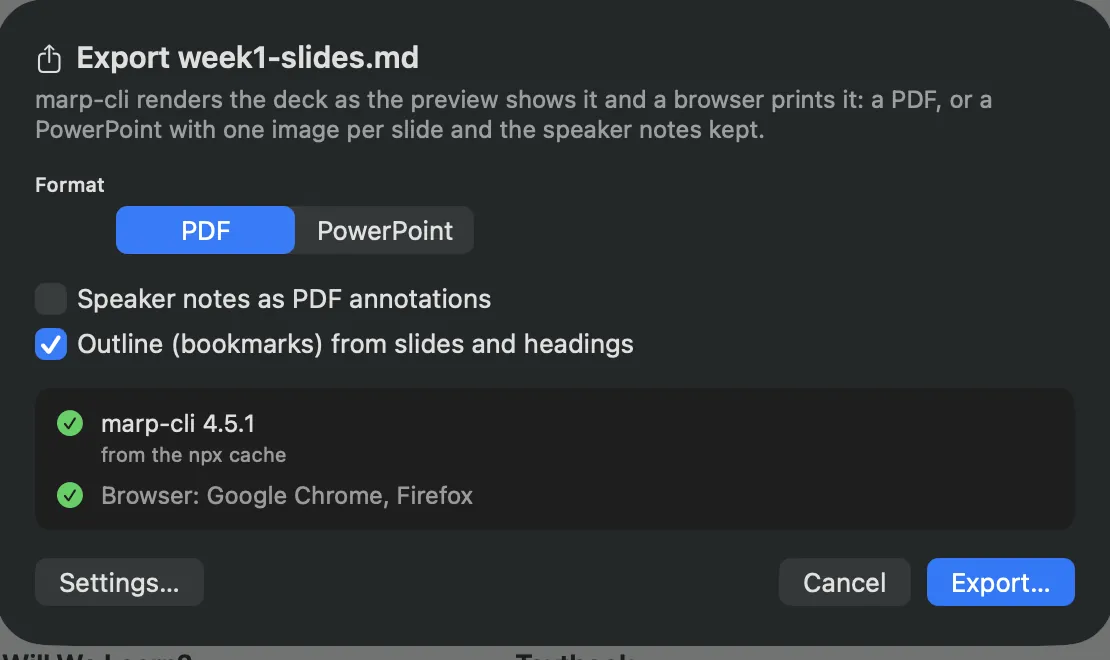
| Control | What it does |
|---|---|
| Format | PDF or PowerPoint. |
| Speaker notes as PDF annotations | The notes of each slide as a note annotation on its page (--pdf-notes). |
| Outline (bookmarks) from slides and headings | A PDF outline, one entry per slide and per heading (--pdf-outlines). On by default. |
| Editable text and shapes (experimental) | PowerPoint only. Off, every slide is one image that looks exactly like the preview, with the notes kept as speaker notes. On, marp-cli rebuilds the slides through LibreOffice so the text can be edited; complex themes may come out incomplete. Disabled when LibreOffice is not installed. |
| The status lines | The marp-cli found and where it came from, or why none was; the browsers in Applications. |
| Export… | The save panel, then the run. The file goes next to the deck by default, named after it. |
Unsaved edits are saved first: marp-cli reads the file on disk. While it runs the sheet shows the step and a Cancel; the first run starts the browser, which takes a few seconds. When it is done the sheet offers Reveal in Finder and Open; marp-cli's warnings, such as an image it could not find, are listed there. A PDF or PowerPoint written next to the deck shows up in the unit's file list.
The options are marp-cli's own: --allow-local-files is always on (marp-cli blocks every local image otherwise, including the ones in assets/), and the bundled ytu-lecture and ytu-talk themes are passed with --theme-set.
When it cannot export#
| The sheet says | What to do |
|---|---|
| marp-cli is not installed | Install it as above, or set the path in Settings › Export. |
| marp-cli was found but does not run | The line under it is marp-cli's own error; a global install broken by a Node.js update is the usual cause. Reinstall it, or let the app use npx. |
| No browser for the conversion | Install Chrome, Edge, Chromium or Firefox, or name one in Settings › Export. |
| Editable PowerPoint needs LibreOffice | Install LibreOffice, or export the plain PowerPoint. |
| marp-cli did not finish in 300 seconds | The browser hung; try again, or run the command below in a terminal to see what it does. |
From a terminal#
The app runs what you would type. Run the commands from the unit's folder so that ./assets/… image paths resolve; --allow-local-files is needed for any local image, --theme-set for a deck that names ytu-lecture or ytu-talk (the theme files live in the themes/ folder of the source repository):
cd "~/Documents/Lecture Studio/cs101-fall26/week3"
marp week3-slides.md --pdf --allow-local-files                 # week3-slides.pdf
marp week3-slides.md --pdf --pdf-notes --pdf-outlines --allow-local-files
marp week3-slides.md --pptx --allow-local-files                # week3-slides.pptx
marp week3-slides.md --html                                    # week3-slides.html, self-contained
marp week3-slides.md --pdf --allow-local-files --theme-set /path/to/lecture-studio/themes
A whole course at once:
cd "~/Documents/Lecture Studio/cs101-fall26"
for f in week*/week*-slides.md; do marp "$f" --pdf --allow-local-files; done
The PDFs land next to the decks. They are ignored when a course is copied into a new term, on purpose: each term exports its own.
Read more#
The guide Export Marp to PDF and PPTX with marp-cli covers what each format keeps and loses and how to script exports.